All students guides
- Start here
- Sign in and get around
- How to use the AI Tutor
- Tutor modes, one by one
- Profiles, notes and sources
- Guided lessons
- Lessons from your faculty
- How to use the Question Bank
- How to use Flashcards
- How to use Clinical Cases
- How to read your Dashboard
- Voice viva (coming soon)
- Use AI the right way
- Student FAQ
- Student quick reference
Speak
Voice viva practice
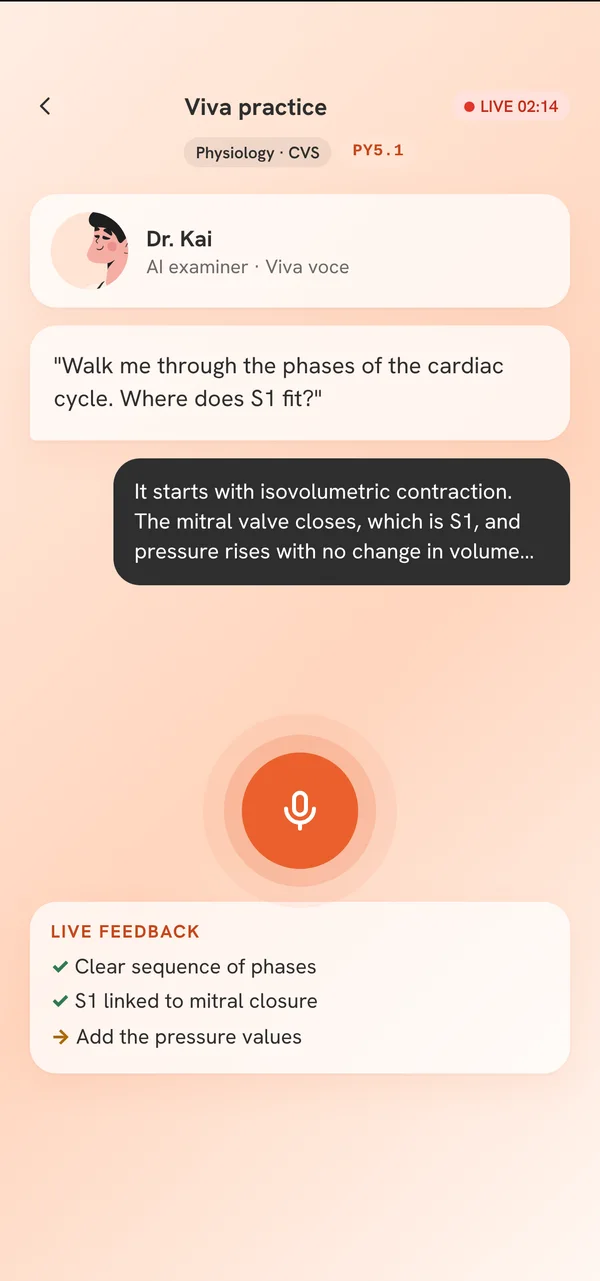
Coming soonPractise vivas and case presentations out loud. An AI examiner asks, listens and gives live feedback on what you covered and what you missed.
When it launches you'll pick a subject, tap the microphone and answer the examiner's question aloud. Feedback appears as you speak: points you covered get a tick, points to add get an arrow.
Until then, Socratic and Case-based modes are the closest way to rehearse a viva in text.