All students guides
- Start here
- Sign in and get around
- How to use the AI Tutor
- Tutor modes, one by one
- Profiles, notes and sources
- Guided lessons
- Lessons from your faculty
- How to use the Question Bank
- How to use Flashcards
- How to use Clinical Cases
- How to read your Dashboard
- Voice viva (coming soon)
- Use AI the right way
- Student FAQ
- Student quick reference
Revise
Revise with flashcards
Flashcards use spaced repetition: how you rate a card decides when you see it next, so you spend time on what you are about to forget.
- Open what's due
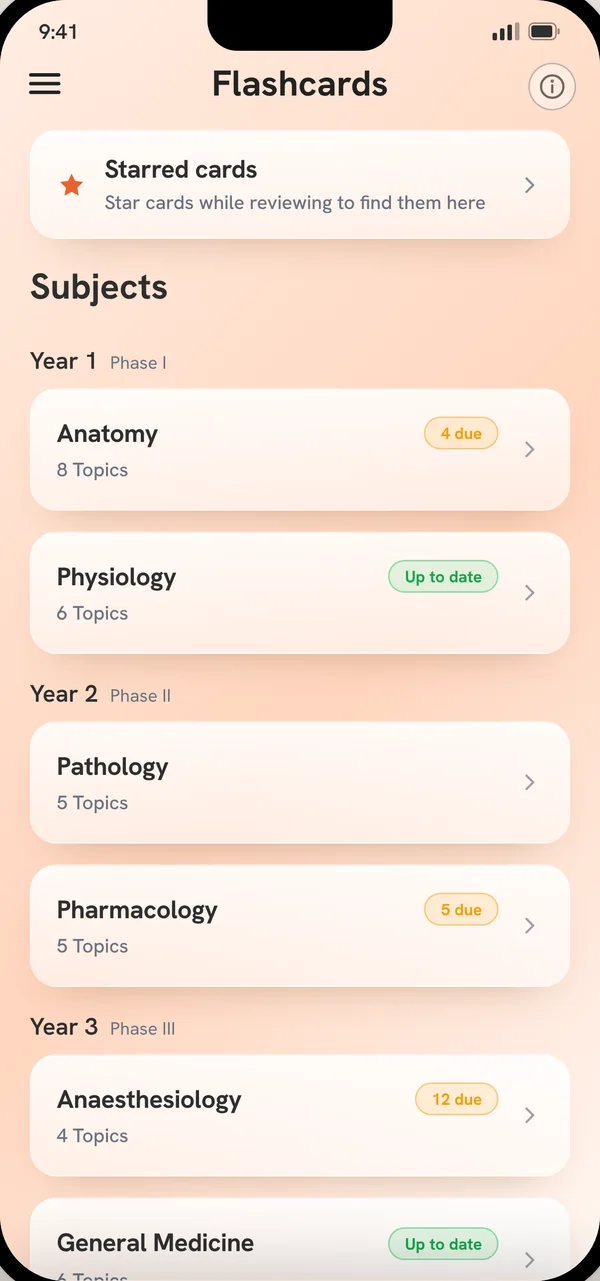
Menu › Flashcards. Each subject shows how many cards are due today, or Up to date. Starred cards collects cards you've starred.
- Pick a competency
Each competency shows its cards, how many you've reviewed and your recall. Tap Start.
- Recall, then flip
Say the answer in your head first. Then tap the card or Flip card. Use Due and Not due to filter the deck.
- Rate honestly
Tap Easy, Medium or Hard. Hard cards come back sooner. Tap the star to save a card, or open References to check the source.