All students guides
- Start here
- Sign in and get around
- How to use the AI Tutor
- Tutor modes, one by one
- Profiles, notes and sources
- Guided lessons
- Lessons from your faculty
- How to use the Question Bank
- How to use Flashcards
- How to use Clinical Cases
- How to read your Dashboard
- Voice viva (coming soon)
- Use AI the right way
- Student FAQ
- Student quick reference
How to use each tutor mode
Each mode teaches differently. Pick one from Default › Tutor Mode, then ask. The pill next to Send shows the mode you are in.
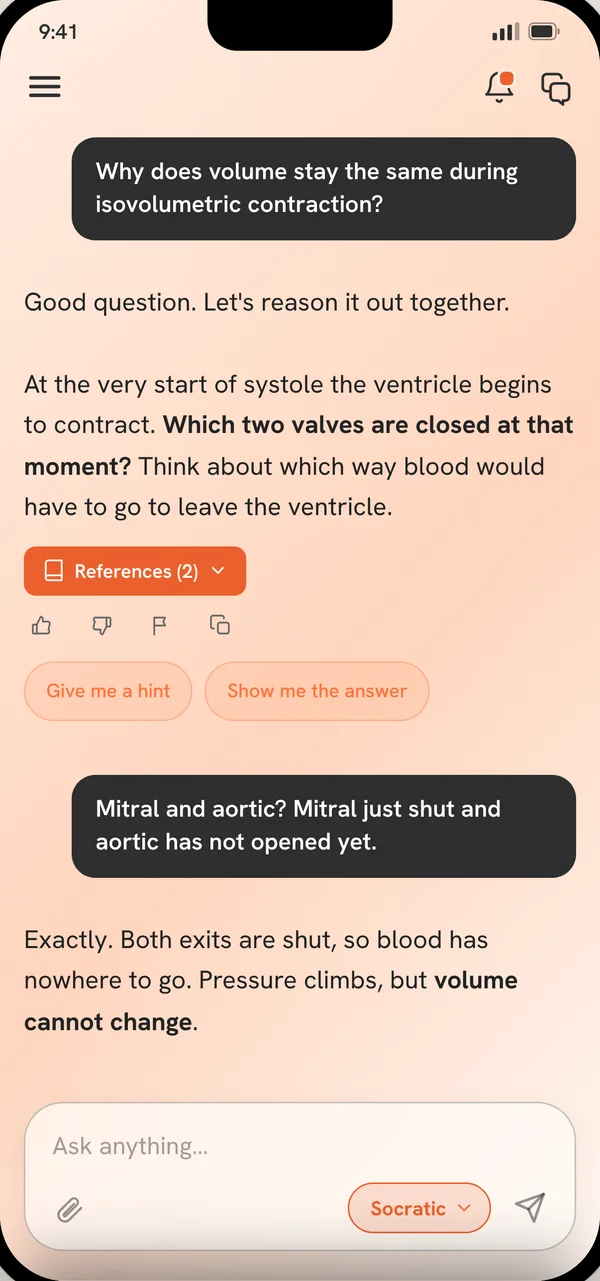
Socratic mode
The tutor answers your question with a question. It walks you one step at a time until you reach the answer yourself, which is how vivas and ward rounds test you.
How to use it
- Tap the pill › Tutor Mode › Socratic.
- Ask a "why" or "how" question.
- Answer the tutor's question in your own words, even if unsure.
- Stuck? Tap Give me a hint. Done? Tap Show me the answer.
Best for
- Mechanisms and physiology
- Viva and ward-round prep
- Topics you have read but can't explain
Try asking
Explain mode
The tutor breaks a topic into numbered steps in plain language, then ends with a quick check question so you know it landed.
How to use it
- Tap the pill › Tutor Mode › Explain.
- Ask "Explain…" with the topic and your level, for example "simply" or "for second year".
- Answer the Quick check at the end.
- Tap References to see the page it used.
Best for
- First read of a new topic
- Watching a lecture didn't make it click
- Sequences: cycles, pathways, phases
Try asking
Case-based mode
The tutor builds a short patient scenario on your topic and asks you to decide, one step at a time: what to ask, what to examine, what to order, what to do.
How to use it
- Tap the pill › Tutor Mode › Case-based.
- Ask for a case: "Give me a case on chest pain".
- Reply to each step with your decision and a reason.
- Use Reveal the next step when you want to move on.
Best for
- Clinical postings and phase III
- NEET PG style reasoning
- Linking theory to a patient
Try asking
Quick Q&A mode
One-line answer first, then three or four bullet points. No long explanation.
How to use it
- Tap the pill › Tutor Mode › Quick Q&A.
- Ask a short factual question.
- Tap a follow-up chip if you want the "why" behind it.
Best for
- Last-minute revision
- Normal values, drugs of choice, definitions
- Rapid-fire self testing
Try asking
Auto mode
Auto keeps Tutor Mode on but lets the tutor decide, message by message, whether to explain, question you or give a case.
How to use it
- Tap the pill › Tutor Mode › Auto.
- Ask as you normally would.
- If you want a fixed style, switch to that mode at any point in the chat.
Best for
- Mixed study sessions
- When you are not sure which mode fits