All students guides
- Start here
- Sign in and get around
- How to use the AI Tutor
- Tutor modes, one by one
- Profiles, notes and sources
- Guided lessons
- Lessons from your faculty
- How to use the Question Bank
- How to use Flashcards
- How to use Clinical Cases
- How to read your Dashboard
- Voice viva (coming soon)
- Use AI the right way
- Student FAQ
- Student quick reference
Track
Read your dashboard
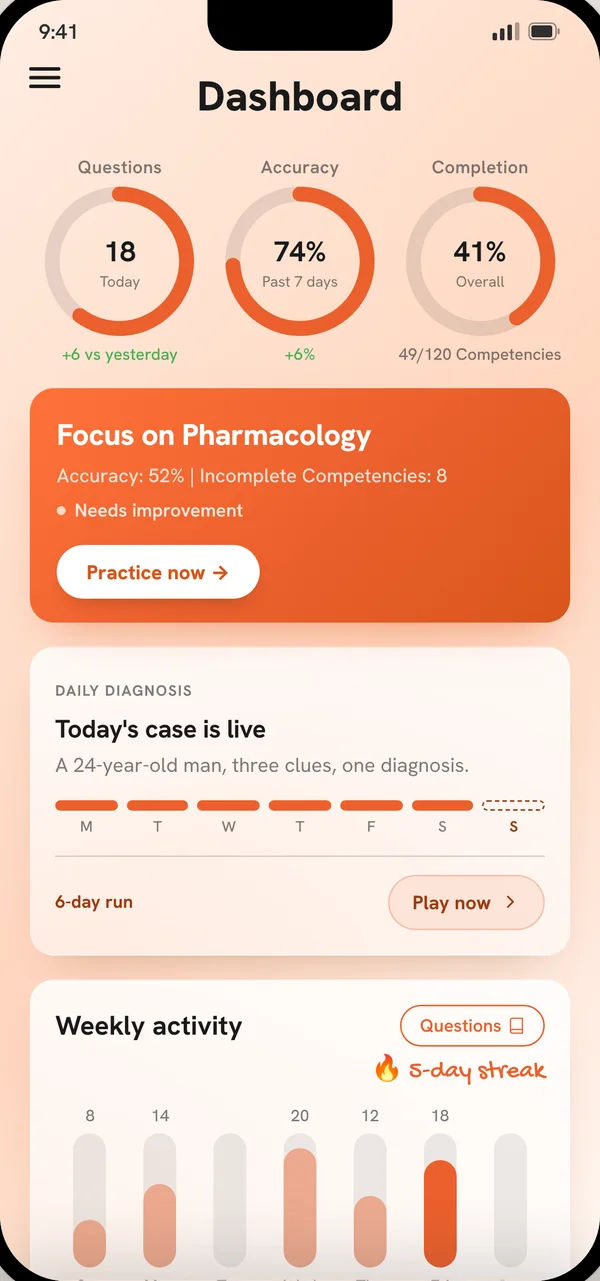
One screen that tells you how much you've practised, how accurate you are and where to focus next.
- Check the three rings
Questions done today, Accuracy over the past 7 days, and Completion of your competencies overall.
- Act on the focus card
The orange card names your weakest subject. Tap Practice now. Daily diagnosis gives you one new case each day to keep your streak.
- Scroll for detail
See your best subject and focus area, case scores by specialty, and flashcards due today with your 7-day recall.