All students guides
- Start here
- Sign in and get around
- How to use the AI Tutor
- Tutor modes, one by one
- Profiles, notes and sources
- Guided lessons
- Lessons from your faculty
- How to use the Question Bank
- How to use Flashcards
- How to use Clinical Cases
- How to read your Dashboard
- Voice viva (coming soon)
- Use AI the right way
- Student FAQ
- Student quick reference
Practise with the Question Bank
Exam-style clinical MCQs organised by year, subject, topic and competency, each with step-by-step reasoning after you answer.
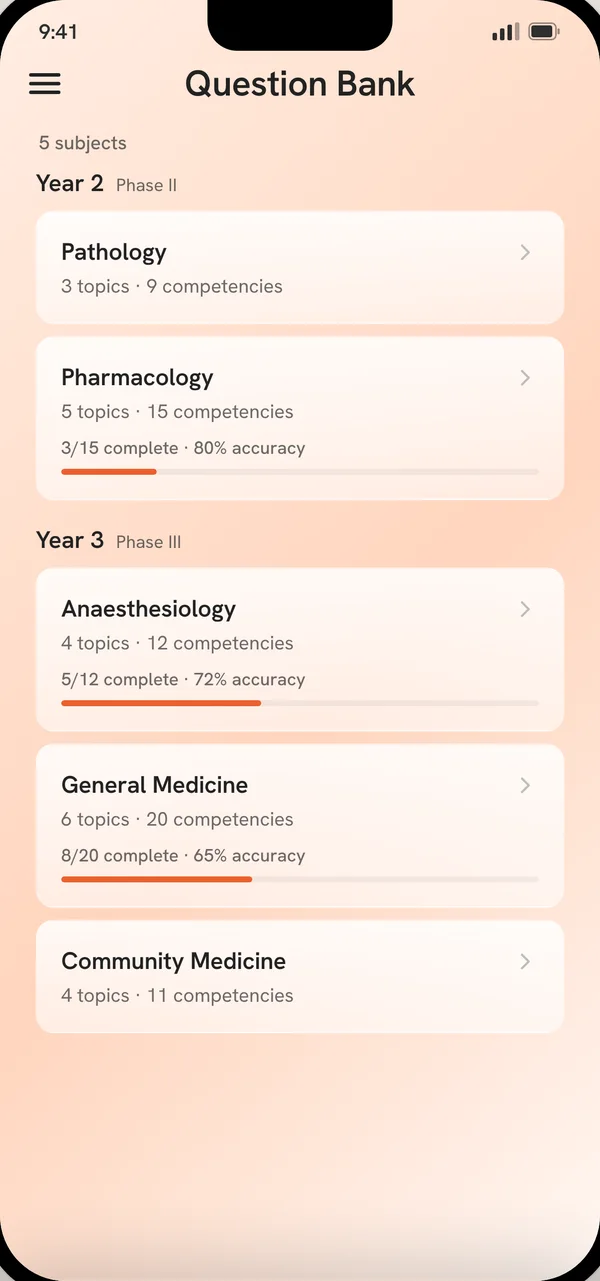
- Choose a subject
Menu › Question Bank. Subjects are grouped by year and phase, with your progress and accuracy under each.
- Pick a topic and competency
Inside a topic you see each competency code, how many questions you've done and your accuracy. Tap Start, Resume or Try again.
- Answer
Select one option and tap Submit answer. The counter at the top shows where you are, and Finish ends the set early.
- Learn from the explanation
The correct option and your pick are marked. Read the short reason, or tap See the full explanation. Then Next question.
Got one wrong and still don't get why? Ask the tutor in Socratic mode with the question pasted in. Working it out yourself sticks better than rereading the explanation.