All students guides
- Start here
- Sign in and get around
- How to use the AI Tutor
- Tutor modes, one by one
- Profiles, notes and sources
- Guided lessons
- Lessons from your faculty
- How to use the Question Bank
- How to use Flashcards
- How to use Clinical Cases
- How to read your Dashboard
- Voice viva (coming soon)
- Use AI the right way
- Student FAQ
- Student quick reference
From your college
Lessons and classes from your faculty
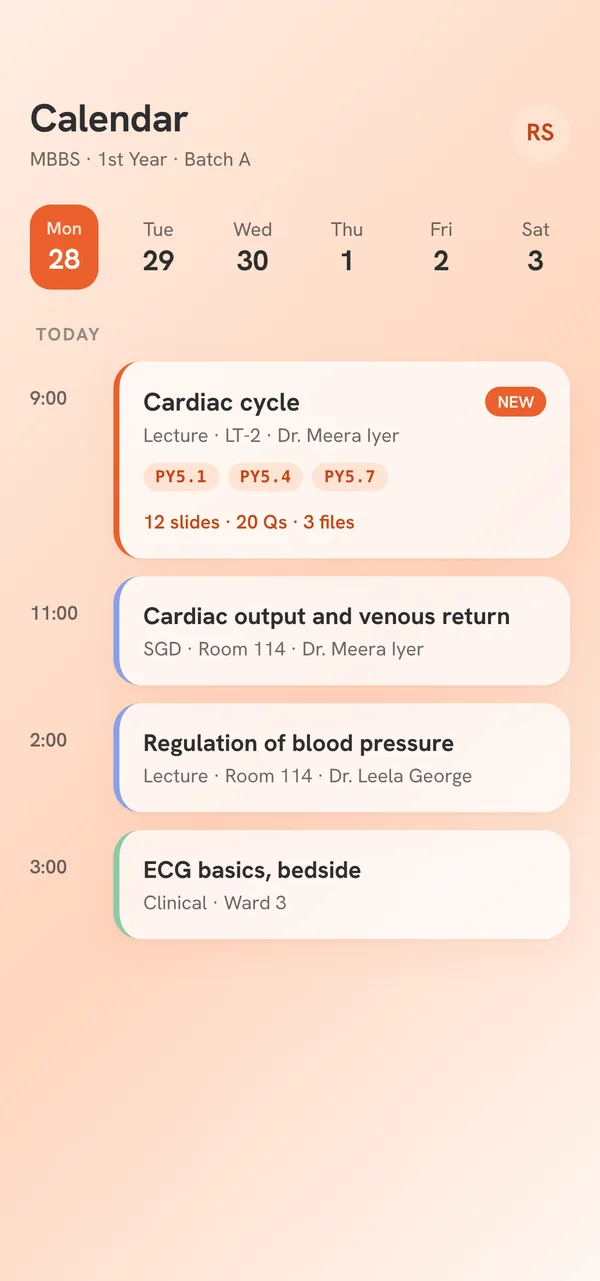
When your college runs GalenAI, your timetable and every lesson your faculty publish appear in the app, organised by competency. You can then use AI on top of them.
Available when your college uses GalenAI- Check today's classes
Your calendar lists each class with its competency codes, room and faculty. A NEW badge means material was just published.
- Open the lesson
Lessons are split into Must know, Good to know and Nice to know. Start with Must know. Slides, PDFs, mind maps and audio from class sit below.
- Take the self check
Answer the short quiz your faculty attached. It tests the same competencies taught in class.
- Revise what you missed
Your score is broken down by competency. Tap Revise with the tutor to go straight to the weak one.