All students guides
- Start here
- Sign in and get around
- How to use the AI Tutor
- Tutor modes, one by one
- Profiles, notes and sources
- Guided lessons
- Lessons from your faculty
- How to use the Question Bank
- How to use Flashcards
- How to use Clinical Cases
- How to read your Dashboard
- Voice viva (coming soon)
- Use AI the right way
- Student FAQ
- Student quick reference
Build your own tutor, add notes, check sources
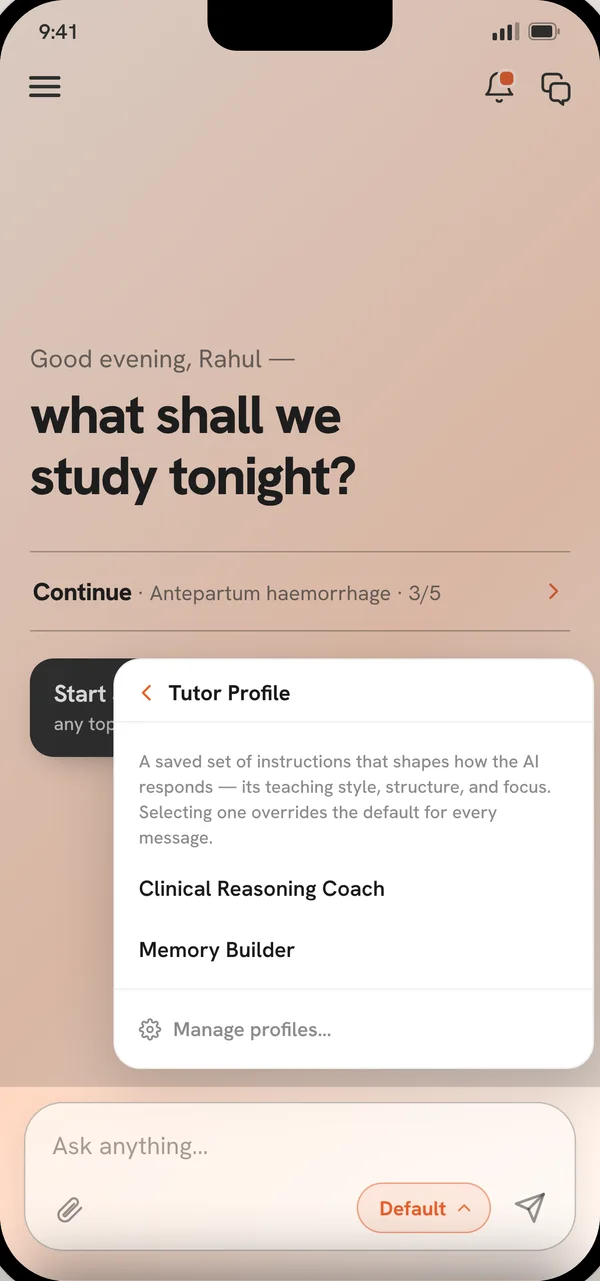
A Tutor Profile is your personal tutor. You write the instructions once: how it should teach, what it should refer to, and how answers should look. Every message then follows them.
- Create a profile
Tap the pill › Tutor Profile › Manage profiles… and add a new profile. Give it a name you will recognise, for example Clinical Reasoning Coach or Memory Builder.
- Write its instructions
Tell it how to teach ("quiz me after every answer", "explain like a senior resident"), what to refer to ("stick to my faculty's lessons and standard references") and the format ("bullet points, end with a mnemonic").
- Use it, then refine it
Pick your profile from the list and ask as usual. If answers aren't quite right, edit the instructions in Manage profiles…. Switch back any time with Default.
- Ask about your own notes
Tap the paperclip in the Ask box and choose a PDF. It appears as a chip, for example Clinical-notes.pdf. Your next question will use it. Tap × to remove it.
- Check the sources
Every reply has a References button. Open it to see the reference or college material behind the answer.